Every feature built for
how you actually think.

Not another chatbot with a canvas skin. Nodalist is a visual thinking system where you build the context, three AI modes expand it, your documents feed it, six AI models can debate it, and deep web research grounds it in cited evidence.
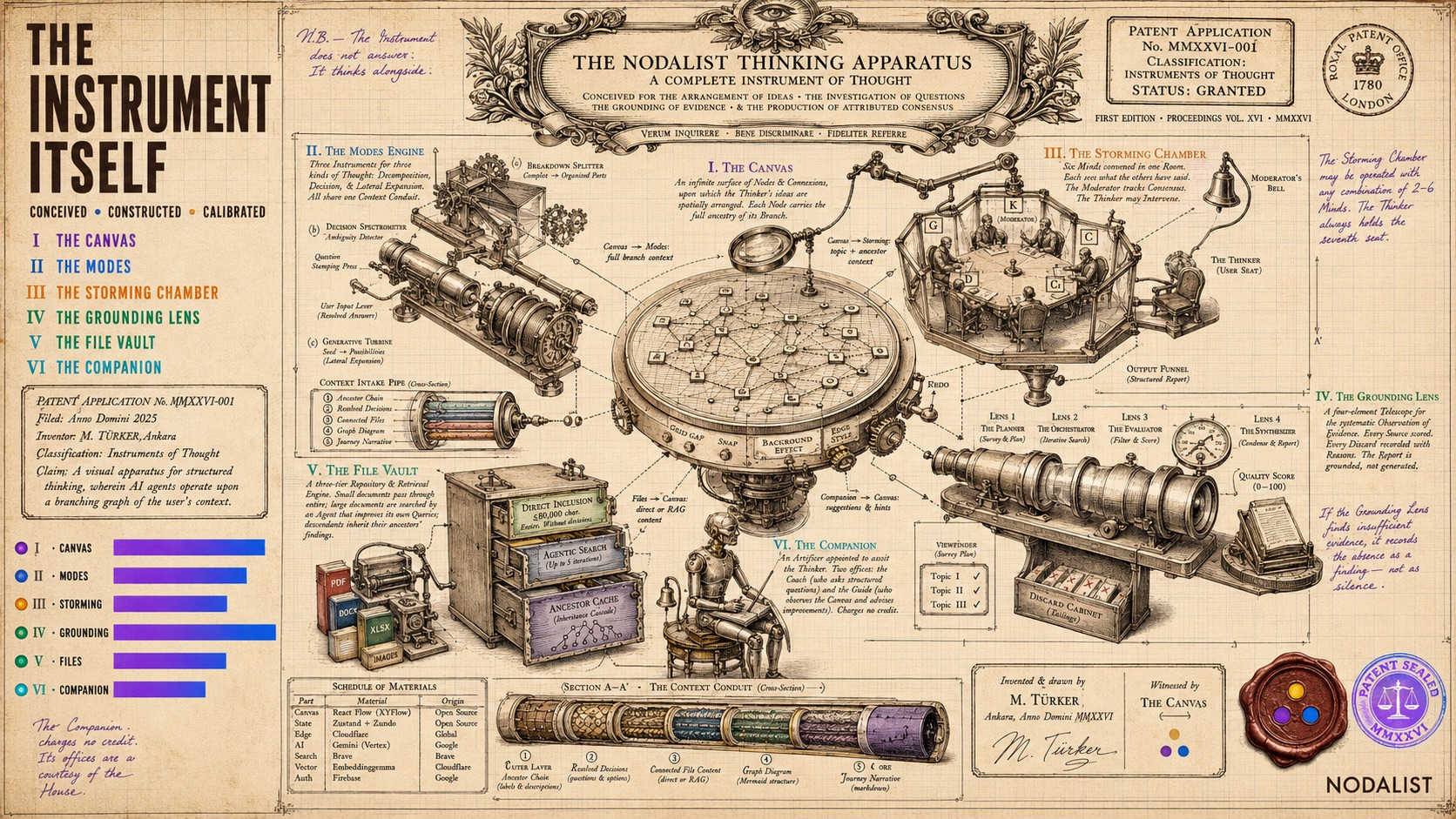
The Nodalist Thinking Apparatus — a patent-style drawing showing all six product components as parts of one precision instrument

The Canvas

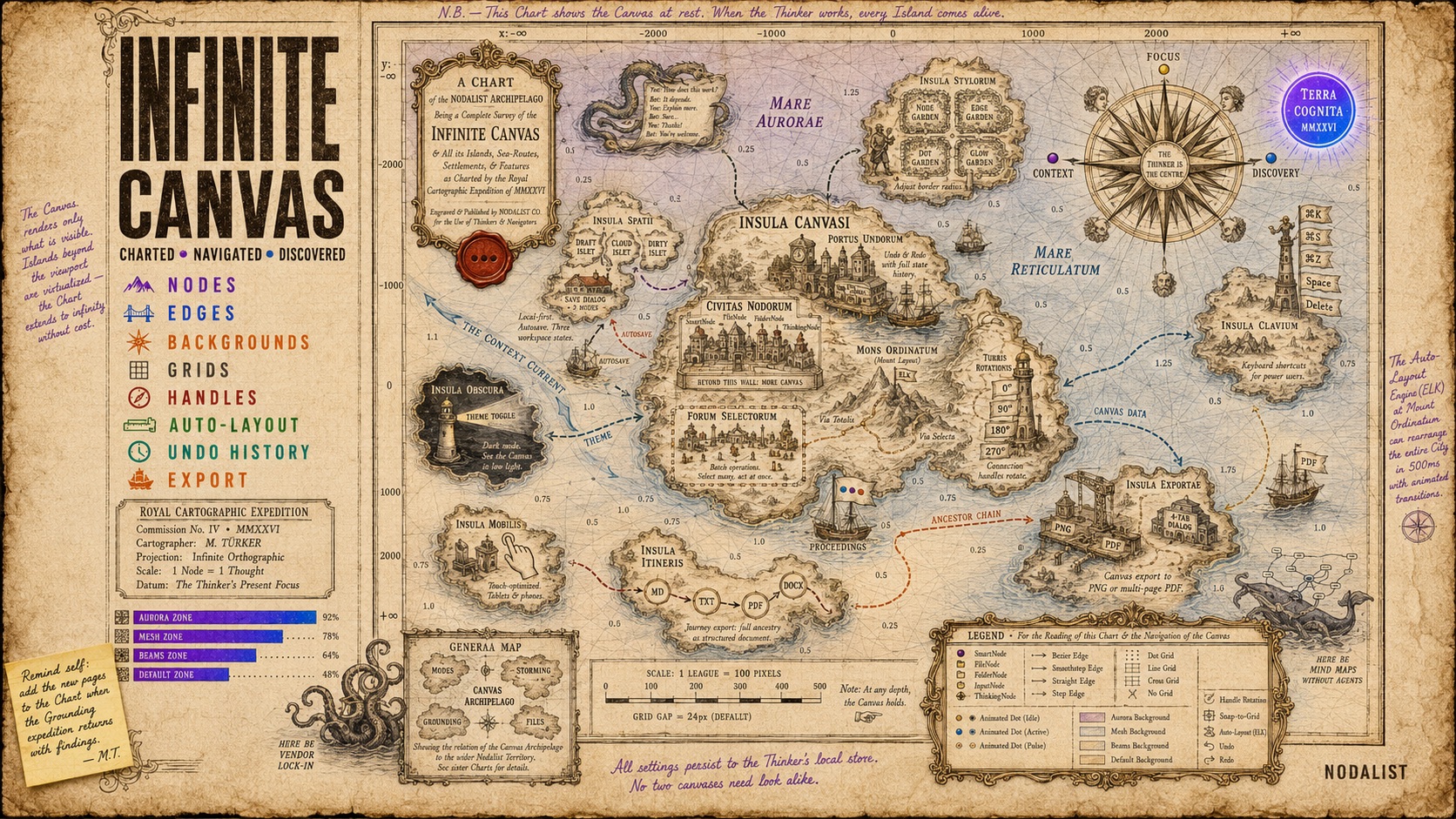
A cartographic chart of the Nodalist Canvas archipelago — every feature rendered as an island in an Age-of-Discovery navigation chart

Your thinking, visualized as a graph.

Every idea is a node. Every connection is a relationship. Instead of scrolling through a wall of text, you see the entire structure of your thinking at once — branches, alternatives, dead ends, breakthroughs. Go back to any node and explore a different direction without losing anything you've already built. This isn't a mind map with AI bolted on. It's a spatial thinking environment where every node carries its full ancestry of context.

Infinite canvas — zoom, pan, organize freely
Nodes carry full context of their entire branch
Undo/redo with full state history (workspace-scoped)
Auto-layout (Tidy Canvas) powered by ELK algorithm
Tidy selected nodes without affecting the rest
Rotating connection handles (4 orientations per node)
Snap-to-grid for precise layouts
Canvas export to PNG and multi-page tiled PDF
Keyboard shortcuts for power users
Light and dark mode across entire UI
Touch-optimized for mobile and tablet
Batch operations — select multiple nodes and act at once

Deep customization — make it yours.

Canvas Settings has four tabs. Every visual parameter is adjustable without writing CSS or touching configuration files.

Background

Choose from four animated effects — default gradient, aurora, mesh, or beams. Set three custom gradient colors, control opacity and animation. Or turn it off for a clean white workspace.

Grid

Dots, lines, cross, or no grid. Adjustable gap, size, and color. Snap-to-grid toggle uses the grid gap as the snap increment for pixel-perfect alignment.

Nodes

Default colors (light and dark mode), border radius (none to full), shadow depth (including a layered 3-layer option), border color and width, divider toggle, title font weight. Per-node color override preserved.

Edges

Path type (bezier, smooth step, straight, step), line style (solid, short-dash, dashed, dotted), animation (flow, pulse, or none), stroke color and width, animated dot shape (circle, arrow, diamond, square), glow intensity, and ancestor path highlighting.

Three AI Modes

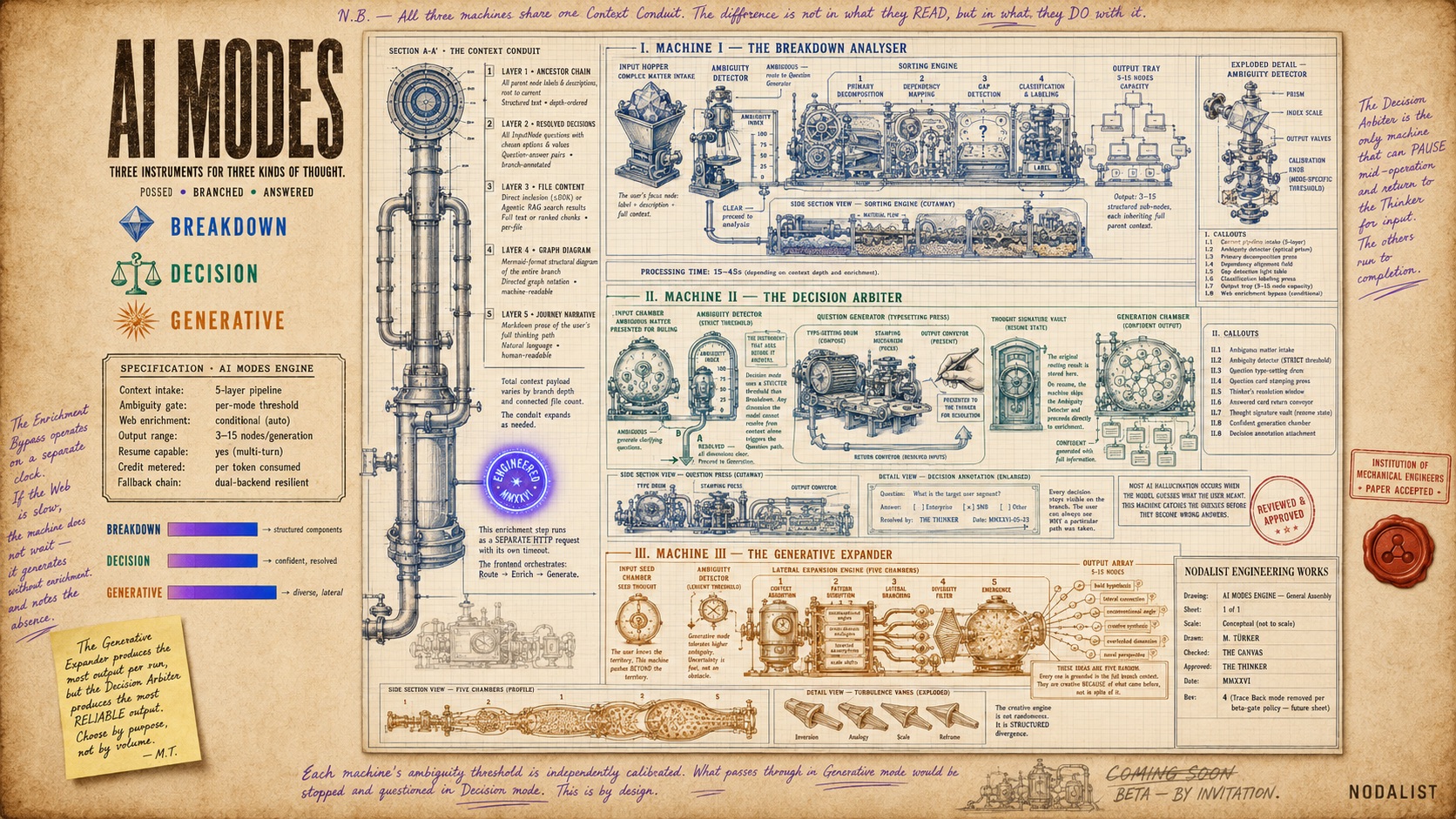
Engineering blueprint of three AI thinking machines — Breakdown Analyser, Decision Arbiter, and Generative Expander sharing one context conduit

Not every problem needs the same approach. Select any node, click the AI button, and choose the mode that fits. AI reads the full branch — every parent node, every decision, every connected file — before generating. Each mode has its own ambiguity detector, question generator, and context builder, tuned for its specific purpose.

Breakdown Mode

Decompose complexity into clear components.

Give it a complex topic and AI splits it into structured sub-nodes — identifying core components, dependencies, relationships, and gaps. Each child node inherits the full context of its parent chain, so drilling deeper doesn't mean losing sight of the bigger picture.

This is where most Nodalist work starts. A strategy question becomes a tree of sub-problems. A product idea becomes a feature breakdown with dependencies. A research question becomes organized dimensions to explore. You see the structure before you commit to a direction.

Decision Mode

AI asks before it answers.

Unlike AI chats that immediately give you an answer, Decision Mode first detects ambiguity. If your problem has dimensions AI can't resolve from context alone, it generates clarifying questions with structured options. You answer. Then AI generates with full confidence.

This matters because most AI hallucination happens when the model guesses what you meant instead of asking. Nodalist's ambiguity detector catches these gaps before they become wrong answers. Your resolved decisions stay attached to the branch as visible annotations — you can always see why a particular path was taken.

Generative Mode

Explore directions you haven't considered.

Open-ended expansion. AI generates diverse ideas, unconventional angles, and lateral connections — all grounded in your existing context. Not random brainstorming: creative thinking that builds on everything you've already established in the branch. Useful when you know the problem space but need to push beyond your initial instincts.

Smart context pipeline

All three modes share the same context engine. Before generating, AI builds a structured payload from: the full ancestor chain (labels, descriptions, decisions), connected file content (direct or via RAG search), a Mermaid graph diagram of the branch structure, and a markdown narrative of the user's journey. This is why Nodalist AI generates differently from a chat — it sees your complete thinking, not a compressed summary.

Canvas Assistant

An AI partner that watches your canvas and helps you think.

The Canvas Assistant lives in a right sidebar with two modes you switch between freely. It's not a chatbot — it's a thinking partner that reads your full canvas state and responds in context.

Challenge Coach

A conversational agent focused on problem structuring. It asks structured questions with selectable option pills, extracts facts from your answers, identifies tensions, and proposes a canvas structure. When you approve, it builds actual nodes and edges on your canvas — converging from facts through tensions to core problems. No credits charged.

Feature Guide

A canvas-aware assistant that reads every node, edge, and connection on your canvas. It suggests improvements — delete redundant nodes, reorganize edges, tidy the layout, or walk you through AI Mode and AI Storming with step-by-step guided hints. Auto-checks every 2 minutes when your canvas changes. No credits charged.

Open with Cmd/Ctrl+K or the Canvas Assistant button. Guided hints appear as floating glass cards that anchor to specific nodes and auto-advance as you follow each step.

AI Storming

Six top AI models. One room. Your problem.

Every AI model has blind spots, tendencies, and strengths others don't share. AI Storming puts six of them in a live debate room — Gemini, ChatGPT, Claude, Grok, DeepSeek, and Kimi — each with your full canvas context. They don't take turns politely. They argue, challenge assumptions, build on each other's ideas, and surface disagreements that a single model would never flag.

Provider Fast Model Thinking Model
Gemini Flash Lite 3.1 Pro 3.1
ChatGPT GPT-5.4 Mini GPT-5.4
Claude Haiku 4.5 Sonnet 4.6
Grok Grok 4.1 Fast Grok 4
DeepSeek V4 Flash V4 Pro
Kimi K2.6 K2.6 Thinking

Multi-round debate

Models respond in rounds, each seeing and reacting to what others said. Not parallel — sequential, building real argumentation.

Moderator AI

A moderator tracks consensus, disagreements, and strongest arguments. Checks after each round if the group has converged.

Structured report

When debate concludes, you get a structured report: key agreements, open disagreements, highest-confidence recommendations, and actionable conclusions.

You can sit back and watch, or jump in to steer the conversation — push back on an idea, ask models to go deeper, or redirect the debate. Each model sees your full canvas context including files, so they're debating your specific situation, not a generic question.

AI Grounding

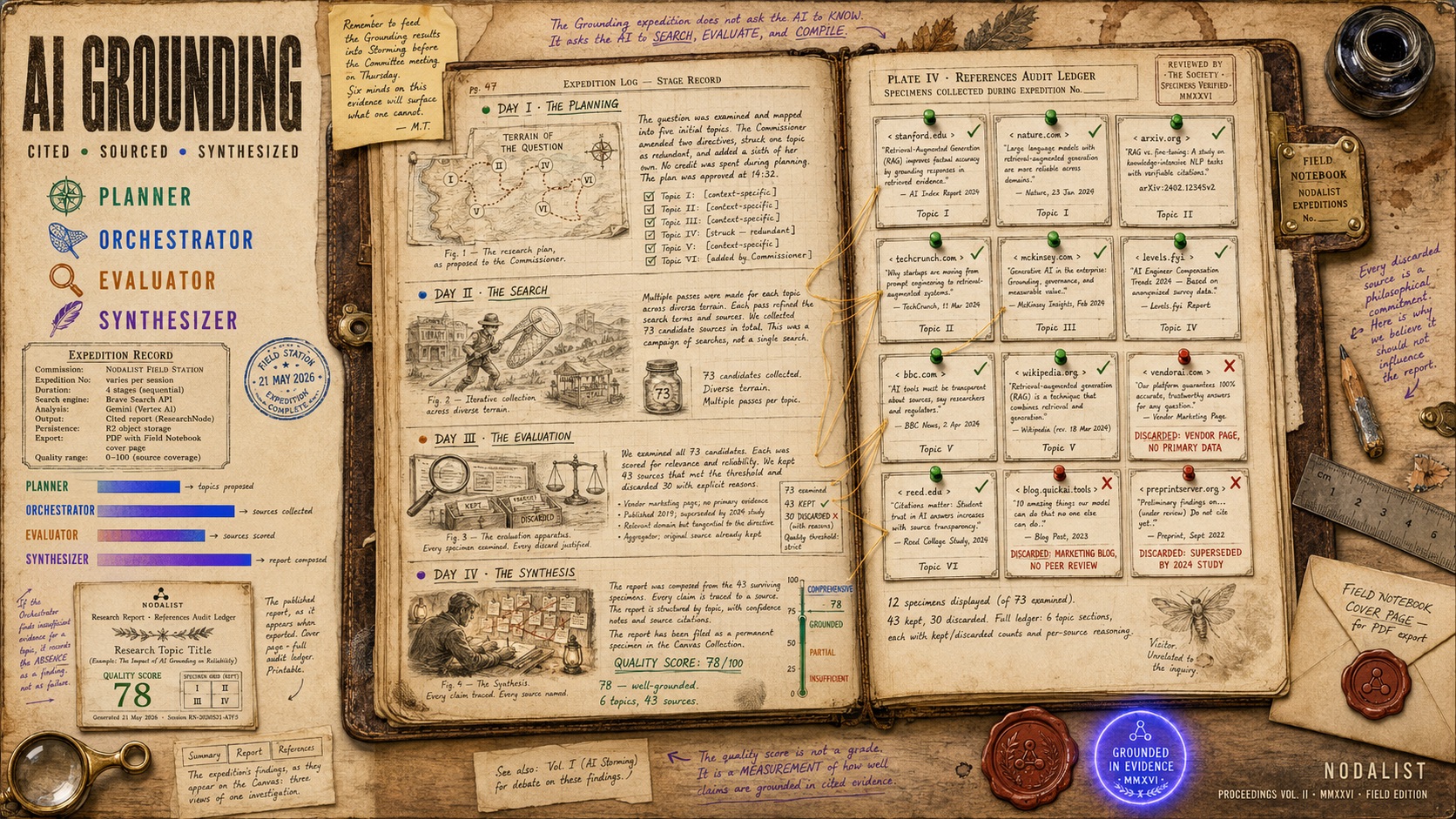
A naturalist's field notebook documenting the four-stage AI Grounding research pipeline — Planner, Orchestrator, Evaluator, Synthesizer — with specimen collection and quality score

Deep web research that lands on your canvas.

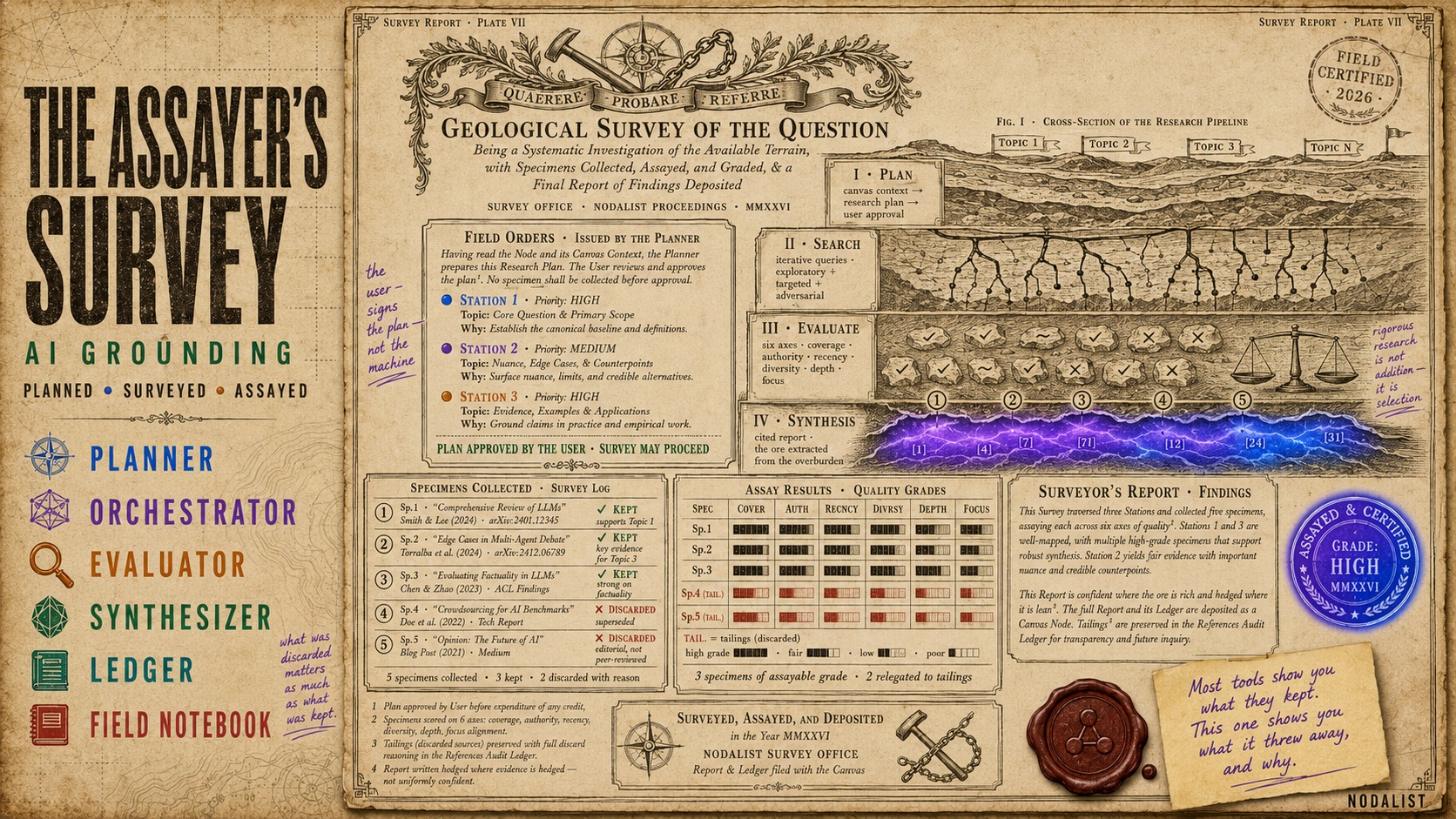
AI Grounding is not a search bar. It's a four-stage research pipeline that reads your canvas context, plans research topics, iteratively searches the open web, evaluates every source for credibility, and synthesizes a fully cited report. The result lives as a persistent, branchable node on your canvas — not a chat reply you copy-paste and lose.

1

Planner

AI reads your canvas context and proposes a list of research topics with specific search directives. You review, edit, add, or remove topics before any credit is spent. The planner explains why each topic matters and what it's looking for.

2

Orchestrator

For each topic, AI searches the web iteratively — not a single search, but multiple queries refined based on what it finds. It collects sources, extracts key information, and builds a raw evidence base across all topics.

3

Evaluator

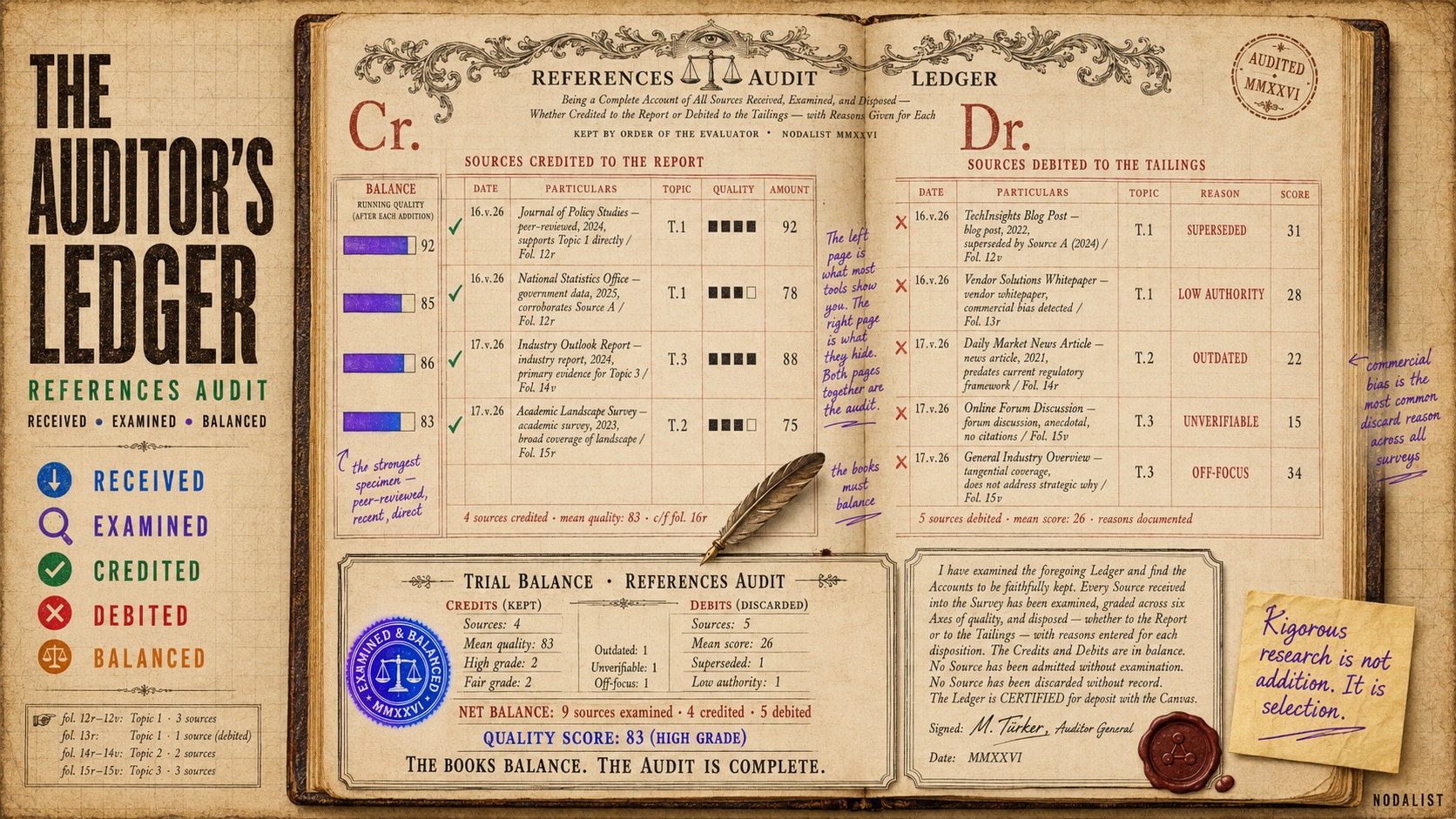
Every source is scored for relevance and reliability. Sources that don't meet the quality bar are discarded — but kept in the References Audit Ledger with specific reasons. You see exactly why a source was rejected, not just the ones that made the cut.

4

Synthesizer

The final stage compresses all kept evidence into a structured, cited report. Every claim traces back to its source. The report is grounded in evidence — not generated from the AI's training data. A quality score (0–100) reflects how well-sourced the findings are.

Review and edit the research plan before it starts
References Audit Ledger — kept and discarded sources with reasons
Quality score (0–100) based on source coverage
Report lands as a canvas node — connect it, branch from it
Feed research into AI Storming for multi-model debate
Export as PDF with Field Notebook cover page
Persistent in R2 — survives workspace saves and reloads
Sidebar with Summary, Report, and References tabs

Learn how AI Grounding works in detail →

The Assayer's Survey — AI Grounding rendered as a geological expedition with specimens collected, assayed, and graded
The Auditor's Ledger — References Audit rendered as a double-entry bookkeeping ledger with sources credited and debited

Files & Intelligence

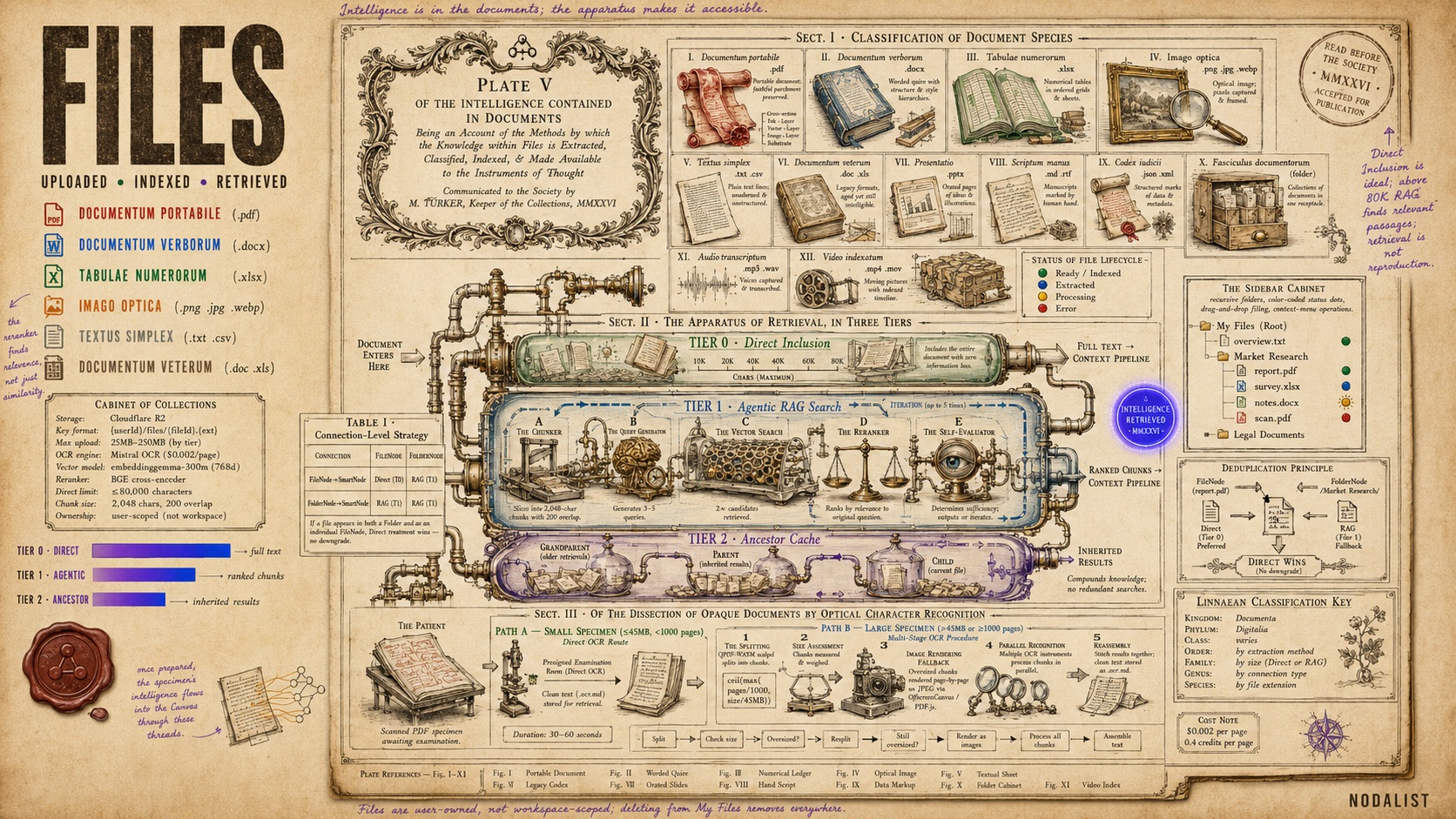
A Philosophical Transactions specimen plate showing document classification, the three-tier retrieval apparatus, and OCR dissection pipeline

Your documents, inside your thinking.

Upload files and connect them to any node. AI doesn't get a vague summary — it reads your actual content and uses it when generating from that node or any of its descendants. Every format you'd expect, with specialized handling for each.

.pdf .docx .xlsx .png .jpg .csv .txt .doc .xls .gif .webp

OCR — Scanned documents, handwritten notes, photos

Small files are processed directly; large files (even 1,000+ pages) are automatically split into chunks, processed in parallel, and reassembled. If a chunk is too large due to shared PDF resources, it's rendered as images and OCR'd that way. The pipeline handles everything — you just click "Run OCR" and get clean, searchable text.

Folder bundles — Multi-file analysis in one connection

Group related files into folders, then drop the entire folder onto your canvas as a single node. AI searches across all files in the folder at once. Status tracking per file (ready, indexing, stale), automatic re-indexing when contents change, and guard checks that block AI generation until all files are indexed.

Three-tier retrieval architecture

Agentic RAG

Most AI tools use basic vector search — embed your question, find similar chunks, return the top results. Nodalist uses a three-tier system that's fundamentally different.

0

Direct Inclusion

— files up to 80K characters

Small to medium files are included in their entirety. Every word, every table, every footnote — zero information loss. No chunking, no retrieval uncertainty. AI sees your complete document exactly as you wrote it.

1

Agentic RAG Search

— large files and folder bundles

For larger files, a dedicated AI agent searches your documents with an iterative loop — not a single pass. It generates diverse search queries, searches the vector index, reranks results with a cross-encoder (BGE Reranker), evaluates whether the results actually answer the question, and refines its approach if they don't. Up to five iterations of self-improving search.

Multi-query generation Cross-encoder reranking Self-evaluating retrieval Up to 5 iterations Graceful fallback to simple search
2

Ancestor Cache

— inherited context across the graph

When you branch deeper, descendant nodes inherit file search results from their ancestors. No redundant searches, no wasted computation. The file knowledge compounds — every new idea automatically carries the research from every node above it.

Files connected as individual FileNodes get direct treatment if they're small (≤80K chars) or RAG search if they're large. Files inside FolderNodes always use RAG. If a file appears in both a folder and as an individual node, the direct treatment wins — no downgrade.

Chain-of-Thought Context

The fundamental difference from AI chats.

AI chats try to keep your context, but they hit limits. When they do, they silently compress — deciding what matters and what doesn't, without asking you. The longer the conversation, the less of your original thinking survives.

Nodalist works differently. You build the context yourself — visually, as a graph. Every node is a deliberate decision about what matters. When AI generates from a node, it reads the full ancestor chain: every parent, every resolved decision, every connected file, the complete graph structure. You control every breakpoint. Nothing is silently dropped.

What AI receives per generation

  • 1. Full ancestor chain (labels, descriptions)
  • 2. All resolved decisions with chosen options
  • 3. Connected file content (direct or RAG)
  • 4. Mermaid graph diagram of the branch
  • 5. Markdown narrative of the full journey

Web search & URL context

The AI pipeline includes an ambiguity detector that decides whether to search the web or scrape specific URLs before generating. If your question needs current information, AI enriches the context automatically — then generates with both your canvas context and fresh web data.

Workspaces & Export

Your work is never lost.

Nodalist uses a local-first architecture. Every change you make is automatically saved to your browser's local storage within 2 seconds. If you close the tab, lose your connection, or your browser crashes — your work is there when you come back. No manual saving required.

Autosave to IndexedDB — 2-second debounce, zero data loss
Auto-resume on next visit — picks up exactly where you left off
Three workspace states: pure draft, dirty cloud, clean cloud
Sidebar shows drafts with visual indicators (italic + cloud-off icon)
Tab title shows unsaved indicator (bullet before workspace name)
Browser beforeunload guard prompts if you have unsaved changes
Anonymous drafts migrate to your account on first signin
Persistent storage permission requested to prevent browser eviction

Cloud workspaces with folders

Save canvases to the cloud. Organize with a recursive folder tree. Quick save, save as new, save as copy. Dirty tracking warns you before losing unsaved work. Workspace-scoped undo/redo clears history on switch. Right-click context menus for rename, move, and delete.

Canvas export (PNG & PDF)

Export your canvas as a single PNG image or a multi-page tiled PDF with page numbers. Four-tab export dialog: Layout (as-is or auto-compacted via ELK), Style (font, colors, shadows), Page Setup (size, orientation, margins), Content (header, footer, selection-only). Fit-rate slider controls content scale from 50% to 200%.

Journey export (4 formats)

Export any node's full ancestor path as a structured document in Markdown, plain text, PDF, or DOCX. The algorithm traces backward through your graph, handles branching and merging with segment-based DFS, and produces depth-based numbering (1, a, i). Decisions annotated, files referenced, folders listed.

Import / Export JSON

Export your entire canvas structure as JSON and import it later or on another device. Unsaved changes guard prevents accidental data loss during import. All IDs are regenerated on import to prevent collisions.

Platform & Security

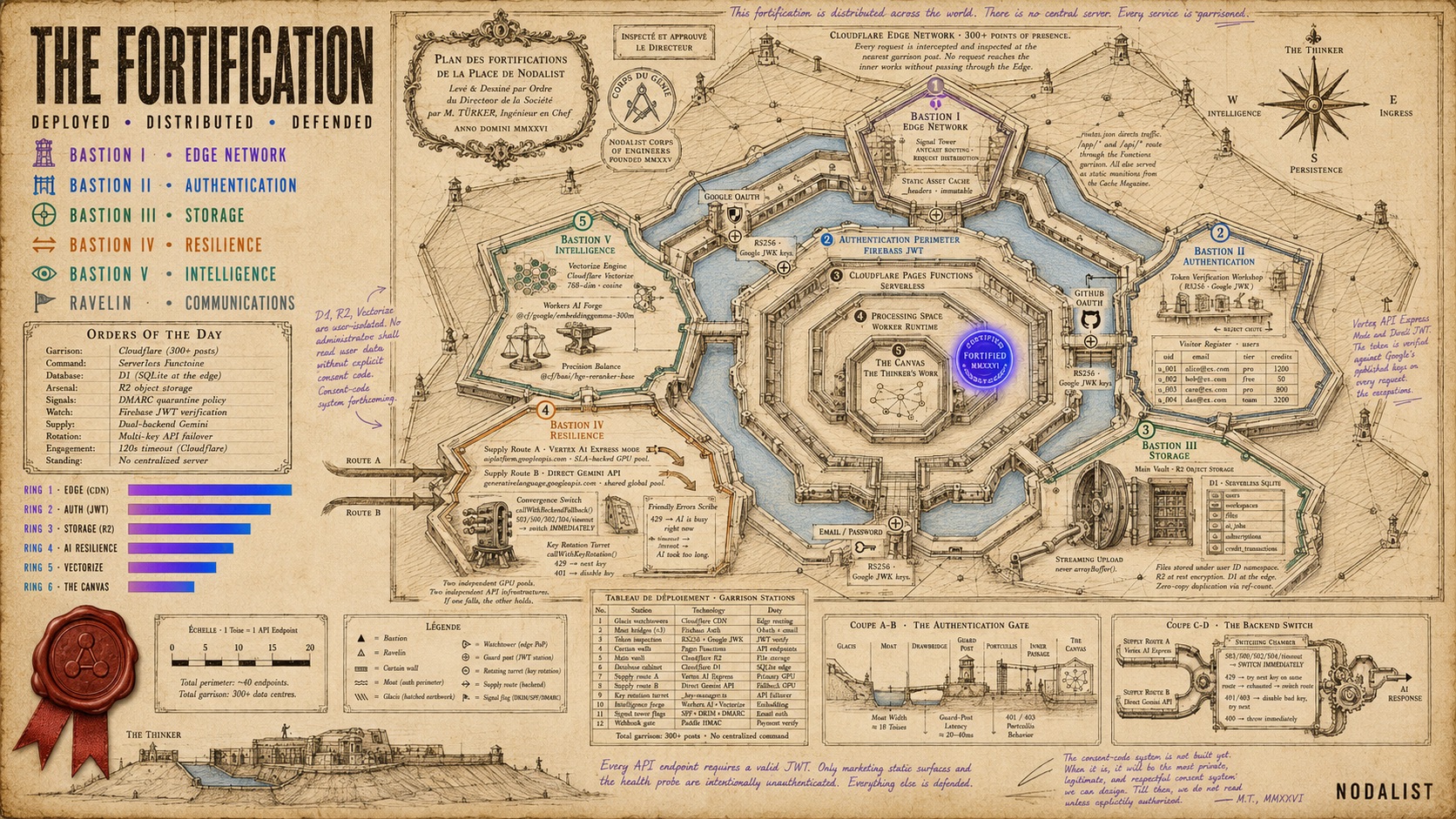
A Vauban star fort plan showing Nodalist's security architecture — five bastions for Edge Network, Authentication, Storage, Resilience, and Intelligence surrounding the Canvas citadel

Built on Cloudflare's global edge. Your data stays yours.

Nodalist runs on Cloudflare Pages with serverless Functions, D1 (SQLite at the edge), R2 object storage, and Vectorize for AI-powered search. No centralized server to go down. Every request is handled by the nearest Cloudflare data center to you — there are 300+ worldwide.

Authentication

Firebase Auth with Google, GitHub, and email/password login. Email verification required. JWT tokens verified server-side on every API call.

File storage

Your files are stored in R2 under your user ID. Files are user-owned, not workspace-scoped — they persist across workspaces. Streaming uploads (never buffered in full).

AI processing

AI runs in-process on Cloudflare Workers with multi-key rotation, dual-backend resilience (Vertex AI + Direct API), and automatic failover. No external VPS dependency.

All API endpoints require authenticated JWT tokens
Paddle payment signature verified with constant-time comparison
Multi-key API rotation with automatic failover on 429/503
Files encrypted at rest in R2, vectorized in Cloudflare Vectorize
No tracking beyond essential analytics — we respect your privacy
DMARC enforced on all outbound email (quarantine policy)
Browser notifications are opt-in — you control what alerts you get
Works on desktop, tablet, and mobile browsers

How Nodalist compares — honestly.

Every tool on this list is powerful and useful. This isn't about being "better" — it's about being built for a different kind of work.

vs AI Chats (ChatGPT, Claude, Gemini, etc.)

AI chats are excellent at answering questions, writing code, analyzing documents, and explaining concepts. For focused, single-turn tasks they're unbeatable. The limitation is structural: chats are linear, context degrades as conversations grow, and you get one model's perspective. Nodalist doesn't replace AI chats — it picks up where they stop being enough. When your problem requires branching, file integration, persistent context you control, or multiple models disagreeing, that's where the canvas matters.

vs Miro / FigJam

Miro and FigJam are collaborative whiteboards built for team workshops — sticky notes, diagrams, flowcharts, meeting facilitation. They're great at what they do. Nodalist is built for individual deep thinking with AI. Every node carries context, AI generates from your graph, files are searchable and embedded in your thinking. Different use case: Miro helps a team align; Nodalist helps one person think harder about a complex problem.

vs Notion / Obsidian

Notion and Obsidian are document-first tools — pages, databases, backlinks, wikis. They're exceptional for organizing knowledge you already have. Nodalist is for working through problems you haven't solved yet. The canvas is spatial, not document-based. Nodes are thinking steps, not pages. AI generation is branch-aware, not page-scoped. If you need a knowledge base, use Notion or Obsidian. If you need to figure out what to put in that knowledge base, that's Nodalist.

vs Mind mapping tools (MindMeister, XMind, etc.)

Mind maps are great for visual brainstorming and quick idea capture. Nodalist shares the visual graph metaphor but adds what mind maps don't have: AI that reads your entire branch before generating, file integration with a full RAG pipeline, decision nodes with clarifying questions, and multi-model debate. A mind map is a map. Nodalist is a map where every node can think.

Ready to think through something hard?

Free to start with 250 credits. No credit card required. Built on Cloudflare's global edge network.

Let's Try