Practical guide · Last updated July 2026
You need an AI research tool. Here's how to pick the right one.
You already know AI can help with research. You've probably tried it — asked a chatbot a question, gotten a well-written paragraph, and then thought: "But is this actually right? Where did this information come from? What did it miss?"
That feeling is the gap between AI answering a question and AI doing research. This page explains the difference, helps you figure out what you actually need, and shows you what Nodalist's AI Grounding offers.
The gap between AI answers and AI research
Let's say you're evaluating whether to expand your business into a new market. You ask an AI: "What's the competitive landscape for SaaS tools in the Nordic healthcare sector?"
Within seconds, you get a polished answer. It mentions market size, names some trends, cites growth percentages. It reads like a consultant wrote it. But did the AI actually find those numbers, or did it generate plausible-sounding statistics from training data? Did it check multiple sources, or did it grab the first thing that matched? Did it look for contradicting evidence, or did it build a one-sided narrative? Did it consider recency — is that growth figure from 2026 or 2021?
You can't tell. And that's the problem. The answer looks like research, but the process behind it wasn't research. It was retrieval with good writing on top.
Real research — the kind you'd trust a decision on — requires something more:
- → A plan that identifies what angles to investigate
- → Multiple rounds of searching, not just one query
- → Source evaluation — not everything on the internet is equally reliable
- → Documented exclusions — what was considered and rejected, and why
- → Honest limits — where the evidence is thin, the writing should say so
An AI research tool is software that does this entire process, not just the first step. Put simply: what you're looking for is an AI research tool that cites sources — not links decorating a summary, but citations you can verify, attached to the claims they support.
The five levels of AI research
Not all AI research tools are created equal. Here's a framework for understanding where different tools fall on the spectrum — and figuring out which level you actually need.
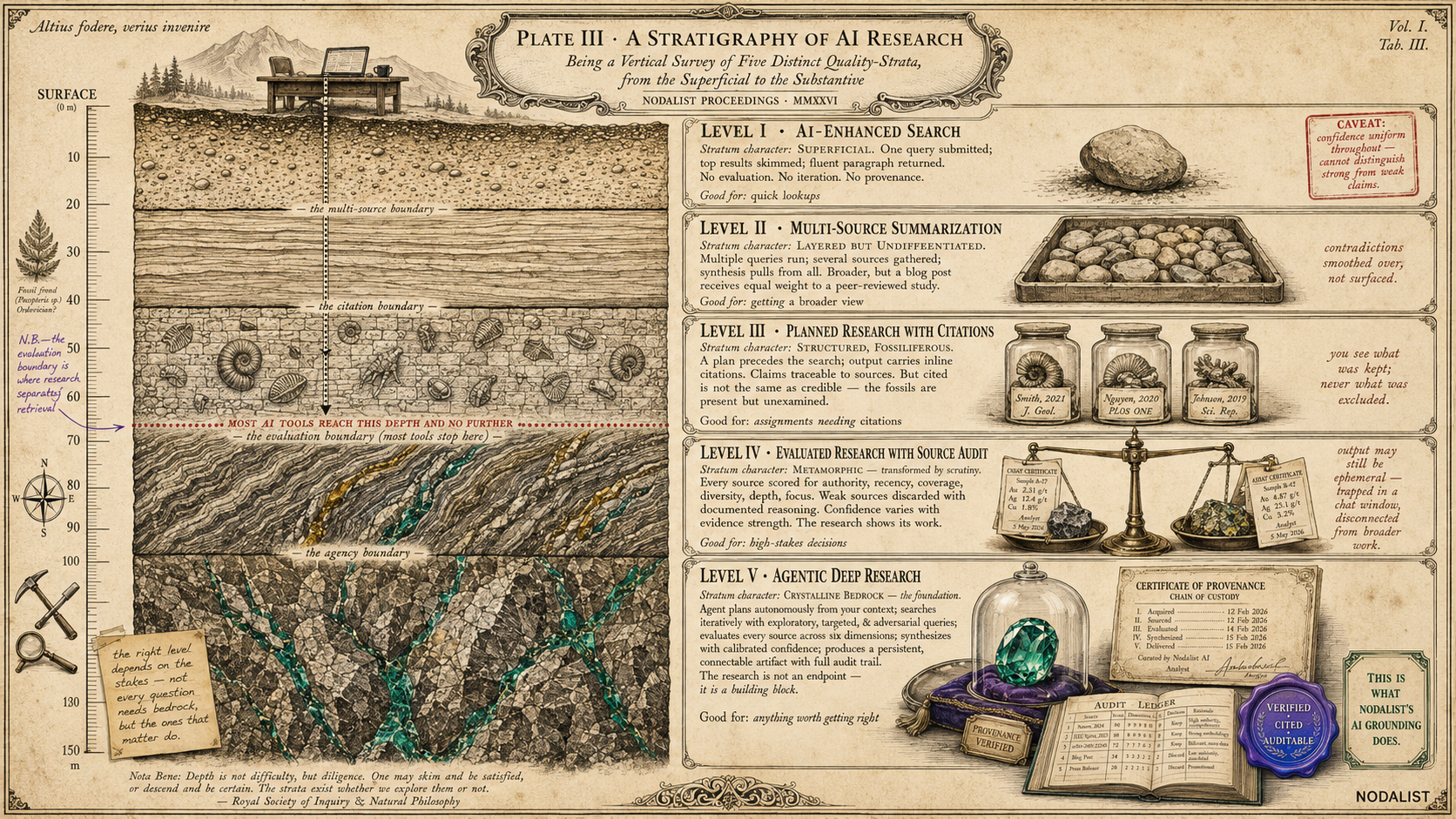
AI-enhanced search
What it does: You type a question. The AI searches the web, reads the top results, and writes a summary with links. One query in, one answer out.
Good for: Quick factual lookups, getting a starting overview, answering "what is X?" questions where the answer is well-established.
Falls short when: You need to trust the answer for a real decision, the topic is nuanced or contested, or you need to know what the AI didn't find.
Multi-source summarization
What it does: The AI searches multiple queries, gathers results from several sources, and writes a longer synthesis that pulls from all of them. More breadth than Level 1, but still no evaluation.
Good for: Getting a broader view of a topic, finding multiple perspectives, reading summaries of several articles at once.
Falls short when: Sources contradict each other (the summary smooths it over), the quality varies widely (a blog post gets equal weight to a peer-reviewed study), or you need to cite specific sources with confidence.
Planned research with citations
What it does: The AI creates a research plan (topics or questions to investigate), searches for each one, and produces a report with inline citations. You can see which claims come from which sources.
Good for: Structured research tasks, getting a report you can trace, assignments and deliverables that need citations.
Falls short when: You need to know if the sources are actually reliable (cited ≠ credible), the plan was optimized for your specific question (generic plans miss specific angles), or you want to see what was considered and rejected (not just what made the report).
Evaluated research with source audit
What it does: Everything Level 3 does, plus: the AI evaluates every source for quality (authority, recency, relevance, depth), discards weak sources with documented reasoning, and produces a report where confidence levels vary based on evidence strength.
Good for: High-stakes decisions, professional deliverables, any context where you need to defend your sources.
Falls short when: The research exists in a chat window and disappears when you close it, or when the output can't connect to your broader project or thinking process.
Agentic deep research (full pipeline)
What it does: Everything Level 4 does, plus: the agent plans autonomously from your context (not generic templates), searches iteratively with multiple query types per topic (exploratory, targeted, adversarial), the plan is editable before any cost, and the output is a persistent artifact that connects to your broader work — not a standalone document.
Good for: Anything where you'd spend more than an hour doing the research manually. Market analysis, literature reviews, due diligence, competitive intelligence, regulatory research, strategic decisions.
This is what Nodalist's AI Grounding does. The research connects to your canvas, feeds into other AI operations, and exports as a professional document with a full audit trail.
The right level depends on the stakes. Googling a recipe? Level 1 is fine. Deciding whether to enter a new market, evaluating a treatment option, or writing a thesis? You want Level 5.
When you actually need an AI research tool
Not every question needs deep research. Here's a simple decision rule, followed by real scenarios where the tool earns its keep.
The decision rule
If you would spend more than 30 minutes researching this manually — opening tabs, reading sources, comparing claims, checking dates, organizing findings — an AI research tool will save you hours and produce better-organized output. If you'd spend less than 5 minutes, just ask a chatbot. The middle ground is where judgement matters: how important is the answer?
Real scenarios
🎓 The graduate student starting a literature review
You've been assigned a thesis topic and need to map the landscape of existing research before you can identify your contribution. Without a research tool, this takes weeks of database searching, paper skimming, and manual organization. With an AI research tool, you get a structured overview of the field in minutes — organized by sub-topic, with citations you can verify and gaps you can target. The tool doesn't write your thesis. It gets you to the starting line ten times faster.
💼 The founder evaluating a new market
You're considering expanding into a market you don't know well. You need to understand the regulatory environment, the competitive landscape, the customer segments, and the pricing norms — and you need to know which of those findings are well-supported and which are based on thin evidence. A chatbot gives you a confident-sounding overview that might be outdated or one-sided. An AI research tool gives you a structured analysis with cited sources, flagged uncertainties, and a record of what it searched and what it couldn't find.
📊 The consultant preparing a client deliverable
Your client is asking for an industry analysis by Thursday. The work needs to be cited, defensible, and thorough enough to survive a boardroom challenge. You don't have time to start from scratch, but you can't afford to hand over AI-generated guesswork. An AI research tool gives you the cited evidence layer — organized by topic, with source quality visible — that you then overlay with your own expertise, client context, and professional judgement. The tool does the sourcing; you do the thinking.
🏥 The person researching a medical condition
You or someone you care about has been diagnosed with something, and you want to understand the treatment options, the evidence behind them, and the tradeoffs. A chatbot gives you a generic overview that sounds reassuring. An AI research tool gives you a structured review of the published evidence — with source quality visible so you can tell which findings come from peer-reviewed studies and which come from health blogs. This is not a substitute for medical advice, but it helps you have a more informed conversation with your doctor.
💰 The investor doing due diligence
Before committing capital, you need to understand the market, the technology, the regulatory risks, and the competitive dynamics. Due diligence is research work at its core — finding evidence, evaluating its reliability, and making sure you haven't missed something important. An AI research tool doesn't replace your fund's research team, but it accelerates the initial evidence-gathering phase and ensures you've covered the obvious angles before diving deeper.
🌍 The person facing a big life decision
Should you move to a new city? Switch careers? Enroll in a specific program? These aren't business questions, but they're research questions: you need evidence about cost of living, job markets, program outcomes, quality of life factors. An AI research tool structures the investigation, finds relevant data, and shows you where the evidence is solid and where you're working with limited information. The decision is still yours. The tool makes sure you're making it with your eyes open.
What to look for in an AI research tool
The market is filling up with tools that call themselves "AI research." Here are the five features that separate the ones that do real research from the ones that do fancy summarization.
Can you see and edit the research plan?
Before the tool starts searching, it should show you what it plans to investigate and let you change it. If the tool goes straight from your question to a finished answer, it decided what to research without your input. That's like hiring a researcher who won't show you their methodology until the report is done. A visible, editable plan is the difference between delegating research and blindly accepting whatever the AI decided to look for.
Does it search iteratively, or just once?
A single search query finds what's obvious. Iterative searching — multiple rounds with different types of queries (exploratory, targeted, adversarial) — finds what's important. Ask whether the tool runs multiple search rounds per topic and whether each round is informed by what the previous one found. If it searches once and moves on, it's a better Google, not a researcher.
Can you see what it threw away?
This is the most underrated feature and the easiest litmus test. If the tool only shows you the sources in the final report, you have no way to know what was excluded. Maybe it threw away a contradicting source. Maybe it excluded a more authoritative study because it was harder to summarize. A serious research tool keeps an audit trail for every source — the discard pile included, with the reasoning behind each exclusion. That's what makes the output auditable instead of just readable.
Does the output distinguish strong evidence from weak evidence?
Read the output carefully. Does every section sound equally confident? If so, the tool is smoothing over uncertainty — exactly what makes AI answers unreliable in the first place. A good research tool writes with calibrated confidence: strong where the evidence is strong, hedged where the evidence is thin, and explicit about where gaps remain. This is harder to build (it requires a separate evaluation stage), which is why most tools skip it.
Does the output persist and connect to your work?
Research that lives in a chat thread dies when you close the tab. Look for tools where the output is a first-class object — something you can save, export, connect to other work, and build on later. Ideally, the research feeds into your next step: a decision, a deeper dive, a team discussion, a document. Research is rarely the end of the process. The tool should treat it as a building block, not a dead end.
How Nodalist's AI research tool works
Nodalist's AI research capability is called AI Grounding. It implements Level 5 — agentic deep research — inside a visual reasoning workspace. Here's what makes it distinct.
Context-aware planning
AI Grounding doesn't start with just your question. It reads your entire canvas context — the node you're researching, the branch of thinking you've built above it, any files you've connected, the decisions made upstream. The Planner uses all of this to propose research topics that are specific to your situation, not generic for your topic. You see the plan, edit it, and approve it before anything is searched. No credits are spent during planning.
A four-stage pipeline with a full source audit
Separate agents Plan, Search, Evaluate, and Synthesize — iterative web search per topic, every source scored across six dimensions, and a References Audit Ledger that documents what was kept and what was discarded, with the reasoning for each. That ledger is what makes the research auditable: you don’t have to trust the AI’s judgement, you can see it. See the full AI Grounding pipeline, stage by stage →
Canvas-native output
The research report lands on your canvas as a persistent, branchable node — not a chat message you have to copy-paste somewhere. Connect it to the question that spawned it. Branch from it with another AI operation. Feed it into AI Storming and let six AI models debate the findings. Use it as context for your next AI mode generation. The research becomes part of your thinking graph, connected to everything else you're working on.
PDF export with Field Notebook cover
Export the full research — report plus the complete References Audit Ledger — as a PDF with a Field Notebook cover page. The cover includes the quality score, topic and source counts, session ID, and timestamp. The document is designed to look and feel like a serious piece of research work, because it is one.

Step by step: running your first research session
From question to cited research artifact in six steps. Typical time: 3–10 minutes after plan approval.
Write your research question on the canvas
Open Nodalist and create a node with the question you need researched. Be specific — 'What is the current regulatory landscape for AI in EU healthcare?' gives the AI more to work with than 'AI regulations'. Add relevant context: connect any files you have, build a branch of related thinking if the question is part of a bigger project.
Launch AI Grounding
Click the AI button on your node and select AI Grounding from the Tools section. The research pipeline activates and begins reading your canvas context — the node, its ancestor journey, any connected files or folders.
Review and shape the research plan
The Planner proposes a list of research topics, each with a description and a strategic reason it matters to your question. Read through the plan. Remove topics that aren't relevant. Add specific topics you want covered. Rephrase any that are too broad or too narrow. No credits are spent during this step — take your time getting the plan right.
Approve and let the pipeline run
Once the plan looks right, approve it. The Orchestrator searches the web iteratively for each topic. The Evaluator scores every source. You'll see progress as each topic completes. A typical session takes 3–10 minutes depending on topic count and complexity.
Generate the research report
When all topics have been searched and evaluated, click Generate Research Report. The Synthesizer reads the approved plan, the kept sources, the evaluation scores, and writes a fully cited report in your language. The report writes confident where evidence is strong and hedges explicitly where evidence is thin.
Use the result — connect, branch, export, debate
Your research lands on the canvas as a persistent node. Open the References tab to see every source — kept and discarded, both with reasons. Connect the research node to other thinking on your canvas. Branch from it with another AI mode. Feed it into AI Storming so six AI models can debate the findings. Export the full audit as a PDF with a Field Notebook cover page.
Research is one part of thinking
Most AI research tools exist in isolation. You ask a question, you get a report, and then you switch to a different tool to actually use the findings. The research and the thinking happen in different places.
Nodalist is built on a different premise: research, analysis, debate, and decision-making all belong on the same canvas. AI Grounding is the research tool. But on the same canvas, you can also:
Break down problems
AI Breakdown mode decomposes complex questions into structured sub-questions.
Map decisions
AI Decision mode structures options, criteria, and tradeoffs visually.
Debate with six AI models
AI Storming runs multi-round debates between Gemini, ChatGPT, Claude, Grok, DeepSeek, and Kimi.
Attach your own files
Upload PDFs, documents, spreadsheets. The AI reads them as context alongside web evidence.
Every operation reads the canvas context that came before it. Research grounded by AI Grounding becomes context for the next AI Storming debate. A decision mapped by Decision mode references the research that informed it. The thinking is cumulative — each step builds on the last, all visible on one canvas.
A research tool that only does research makes you switch tools for the rest of your thinking. A research tool inside a reasoning workspace makes the research part of the work.
What it costs
AI Grounding is included in every Nodalist plan — including the Free tier. You see the credit estimate before approving the research plan, so there are never cost surprises.
Free
$0 / month250 credits per month
1 AI Grounding session per day. Full canvas, all AI modes, and AI Storming included. No credit card required.
Starter
$5.99 / month1,000 credits per month · No daily limit
Unlimited research sessions. File uploads up to 25 MB. 1 GB storage.
Pro
$14.99 / month2,500 credits per month · No daily limit
Unlimited research sessions. File uploads up to 100 MB. 5 GB storage. OCR for scanned documents.
Enterprise
$99 / month18,000 credits per month · No daily limit
Volume research. File uploads up to 250 MB. 15 GB storage. Priority support.
Yearly billing available at ~25% discount. See full pricing details →
Frequently asked questions
What is an AI research tool?
An AI research tool is software that uses artificial intelligence to help you find, evaluate, and synthesize information about a topic. The term covers a wide spectrum — from simple AI-enhanced search engines that summarize web results, to full agentic deep research systems that autonomously plan research strategies, search iteratively, evaluate source quality, and produce cited reports with audit trails. What you need depends on the stakes: casual questions are fine with a quick AI summary, but important decisions deserve a tool that shows its work.
How is an AI research tool different from just asking ChatGPT?
When you ask a chatbot a question, it generates an answer from training data, sometimes supplemented with a web search. An AI research tool adds structure: planning what to investigate, searching the web across multiple rounds, evaluating every source for quality, documenting what was kept and discarded, and producing a cited output you can verify. The fundamental difference is auditability — a chatbot gives you an answer to trust; a research tool gives you evidence to check.
Can I use an AI research tool for academic work?
Yes, with clear boundaries. An AI research tool can accelerate the discovery and organization phase of academic work — finding relevant papers, mapping the landscape of existing research, identifying gaps in the literature, and organizing findings by theme. It cannot replace critical reading of primary sources, original analysis, or the domain expertise needed to evaluate claims within a specific field. Use it as a research accelerator, not an author. Always verify cited sources independently before including them in academic submissions.
What should I look for in an AI research tool?
Five things: (1) A visible research plan you can edit before the tool starts working. (2) Iterative, multi-round search — not just one query per topic. (3) Source evaluation with documented discard decisions — showing what was excluded and why. (4) Honest confidence signaling — the output should distinguish between well-supported and weakly-supported findings. (5) An output format that persists and connects to your other work, not a chat response that disappears when you close the tab.
How does Nodalist's AI research tool work?
Nodalist's AI research tool is called AI Grounding. It runs a four-stage pipeline inside a visual reasoning workspace. The Planner reads your canvas context and proposes research topics for you to review and edit. The Orchestrator searches the web iteratively for each approved topic. The Evaluator scores every source across six dimensions. The Synthesizer writes a cited report honoring the evaluation scores. The output is a persistent canvas node with a References Audit Ledger showing every source considered — kept and discarded, both with reasons. You can connect the research to other nodes, branch from it, feed it into AI Storming, or export it as a PDF.
How much does Nodalist's AI research tool cost?
AI Grounding is included in every Nodalist plan, including the Free tier. Free users get one research session per day with 250 monthly credits. Paid plans start at $5.99/month (Starter, 1,000 credits) with no daily limit. Pro is $14.99/month (2,500 credits) and Enterprise is $99/month (18,000 credits). Each session costs credits based on topic count — you see the estimate before approving the plan, so there are no surprises. Top-up credit packs are available from $4.99.
What kinds of questions work best with an AI research tool?
Questions where the answer requires evidence from multiple sources, where source quality matters, and where being wrong has real consequences. Strong use cases: market research, competitive analysis, investment due diligence, academic literature reviews, policy research, medical information gathering (non-diagnostic), technology evaluation, regulatory landscape mapping. Weak use cases: simple factual lookups ('capital of France'), pure opinion questions ('best restaurant'), or questions that require private/proprietary data the tool can't access.
Can an AI research tool access paywalled or private content?
Most AI research tools, including Nodalist's AI Grounding, search the open web — publicly accessible pages, open-access publications, government data, news articles, and freely available reports. They typically cannot access paywalled academic journals, proprietary databases, internal company documents, or subscription-only content. For paywalled academic papers, the tool may find the abstract, citation data, and any open-access versions. You can supplement AI research with your own paywalled sources by uploading files to your Nodalist canvas — the AI will use both web evidence and your uploaded documents as context.
How long does an AI research session take?
A typical AI Grounding session takes 3–10 minutes from plan approval to completed report, depending on the number of topics and the depth of evidence available. The plan review step (where you edit topics before the search begins) takes as long as you need — there's no timer. For comparison, the same research done manually — opening browser tabs, reading sources, evaluating credibility, organizing findings — typically takes 4–8 hours for a thorough job.
What is the References Audit Ledger?
The References Audit Ledger is the per-topic record of every source the research pipeline considered. For each topic, the ledger shows: the sources that were kept (with the reasoning for inclusion) and the sources that were discarded (with the reasoning for exclusion). The ledger is viewable inside the canvas node and is part of the PDF export. It exists because research you can't audit isn't really research — it's an answer you're asked to trust on faith. The ledger lets you check the AI's homework.
Further reading
- What is AI Grounding? — the full reference for Nodalist's coined term: four-stage pipeline, References Audit Ledger, Field Notebook PDF, the AI Storming counterweight.
- Agentic Deep Research: What It Is and How It Works — the category-definition reference: what the paradigm means, why it matters, the five stages, who uses it.
- AI Storming — the upward counterweight: six AI models debating one question. Storm to explore, ground to verify.
- All Nodalist features — the full visual reasoning workspace: AI modes, file intelligence, folder bundles, journey export.
- Pricing — plans, credits, yearly billing, and top-up packs.
Try real AI research on your next important question
AI Grounding is the research tool inside Nodalist — the visual reasoning workspace. Plan your research, search iteratively, see every source the AI considered, and get a cited report you can audit, connect, and build from. Free to start.
Try AI Grounding free